Spanish course: exercises that follow the lesson I watched
I built myself a practice app for the 82-video Spanish series I follow on YouTube. Claude Code reads the videos’ subtitles and writes a short explanation and exercises for each lesson. I can’t move on until I score 80% on the current one.
Open the app- Role
- Lesson flow and learning rules; content, build and release with Claude Code
- Period
- Oct 2026
- Platforms
- JavaScript, Claude Code, YouTube transcripts, Cloudflare Workers, GitHub
Context
I’m learning Spanish from an 82-video series on YouTube. I have Palabra for vocabulary, but nothing to practise the lessons themselves. Once I finished a video, the topic slipped away.
After the first 10 lessons I wrote to Claude Code what I wanted: a short explanation and fill-in and multiple-choice exercises for each lesson, with the English meaning on hover. The focus: verb conjugation, articles and pronouns. No past tense until the present tense has settled.
Prompt · 18 Oct 2026 The message I wrote to Claude Code Read itClose
Translated from the Turkish original. I fixed typos; otherwise it’s as I wrote it. I attached a screenshot of the playlist to the message.
I’m watching a Spanish course on YouTube. It’s an 82-lesson video series. I’ve watched the first 10 episodes and I want to prepare explanations and exercises like fill-in-the-blanks and tests on their topics. You can see the topic titles of each video.
In the exercises and explanations, when the mouse is over a word, its meaning should show in English. So the exercises should be Spanish–English. The app should be for someone learning Spanish from zero.
I especially want to really understand verb conjugation, article changes and pronouns, so focus on these. You need to teach me well how regular and irregular verbs are conjugated. We should start with the present tense; I want to move to the past tense only after the present tense has really settled. It should be done so that someone learning Spanish from zero doesn’t get confused.
Here’s what I want: the lessons have a set order, personal pronouns, alphabet, articles, one after another, so the app should follow the same order. But we shouldn’t be able to move on before finishing one.
Each topic should have an explanation, exercises and a “done exercises” section. I’ll first review the topic in the explanation, then do its exercises; the exercises I do should go to “done exercises”. The exercises section should have a generate option where I can create new exercises.
The explanation and exercises shouldn’t be too long, 1–1.5 pages is enough; say 25 fill-in-the-blanks and 10 test questions. They must match my level and connect to the previous topic. So while I study articles in lesson 5, I should also use the personal pronouns from lesson 3, and the words I saw there should come up so I review them. But don’t forget to add new words too.
Is it smarter to add lessons as I watch them, or should I send you the whole playlist and have the topics unlock as I watch? Or should I send the links to all the videos so you go through their transcripts? Which would work better?
The problem: the exercises should teach what the lesson taught
Ready-made exercise sites follow their own order. On one site the fifth topic can be the past tense; in my series the past tense starts at lesson 61. The exercises shouldn’t be a step ahead of or behind what the teacher has covered so far, and they should reuse his words and examples.
So we decided to write the content from the videos themselves, not from their titles.
What I built
1. Lessons from transcripts
Claude first pulled the 82 titles of the playlist and set aside the homework checks and Q&A videos, leaving 70 numbered lessons. Then it downloaded the automatic Turkish subtitles of the 10 lessons I had watched (text only, not the videos) and read them: about 27,000 words.
The explanations came from there. The sentences the teacher gave as homework are in the exercises. His comparison of usted with old Turkish “zatıaliniz” is in the explanation. Irregular verbs are taught in the same four groups he uses.
One decision was Claude’s suggestion: all 70 lessons stay in the list, but content is written only for the lessons I’ve watched. Writing the whole series up front would have made it impossible to adjust to where I get stuck.
2. Locks
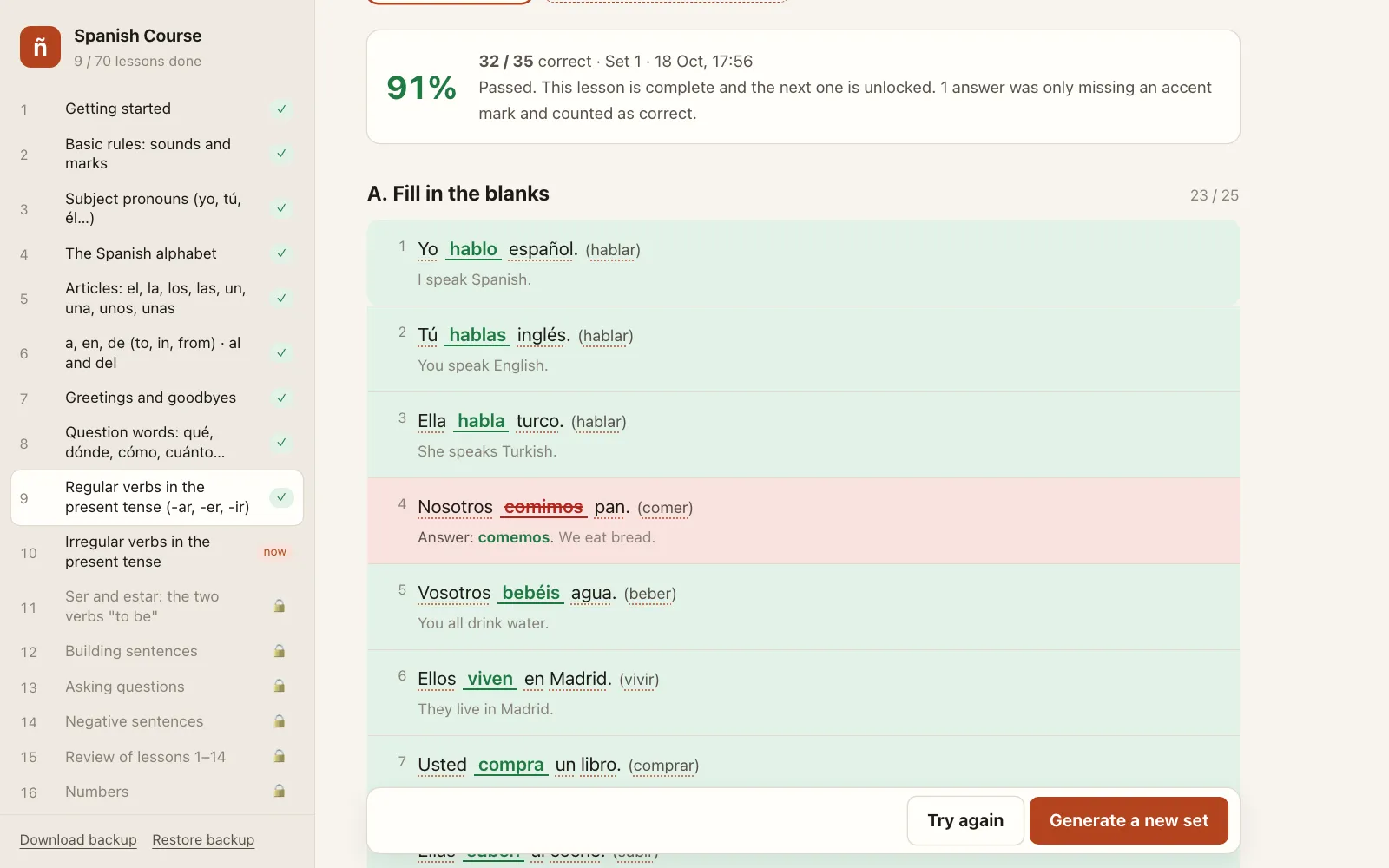
Lessons open in playlist order. A lesson is finished when two things are true: I scored at least 80% on a set and I ticked “I watched the video”. The exercises alone don’t pass a lesson, so I can’t skip the video.
Each lesson has three tabs: Explanation, Exercises and Completed exercises. Every checked attempt is saved with its answers.
3. Exercise generator
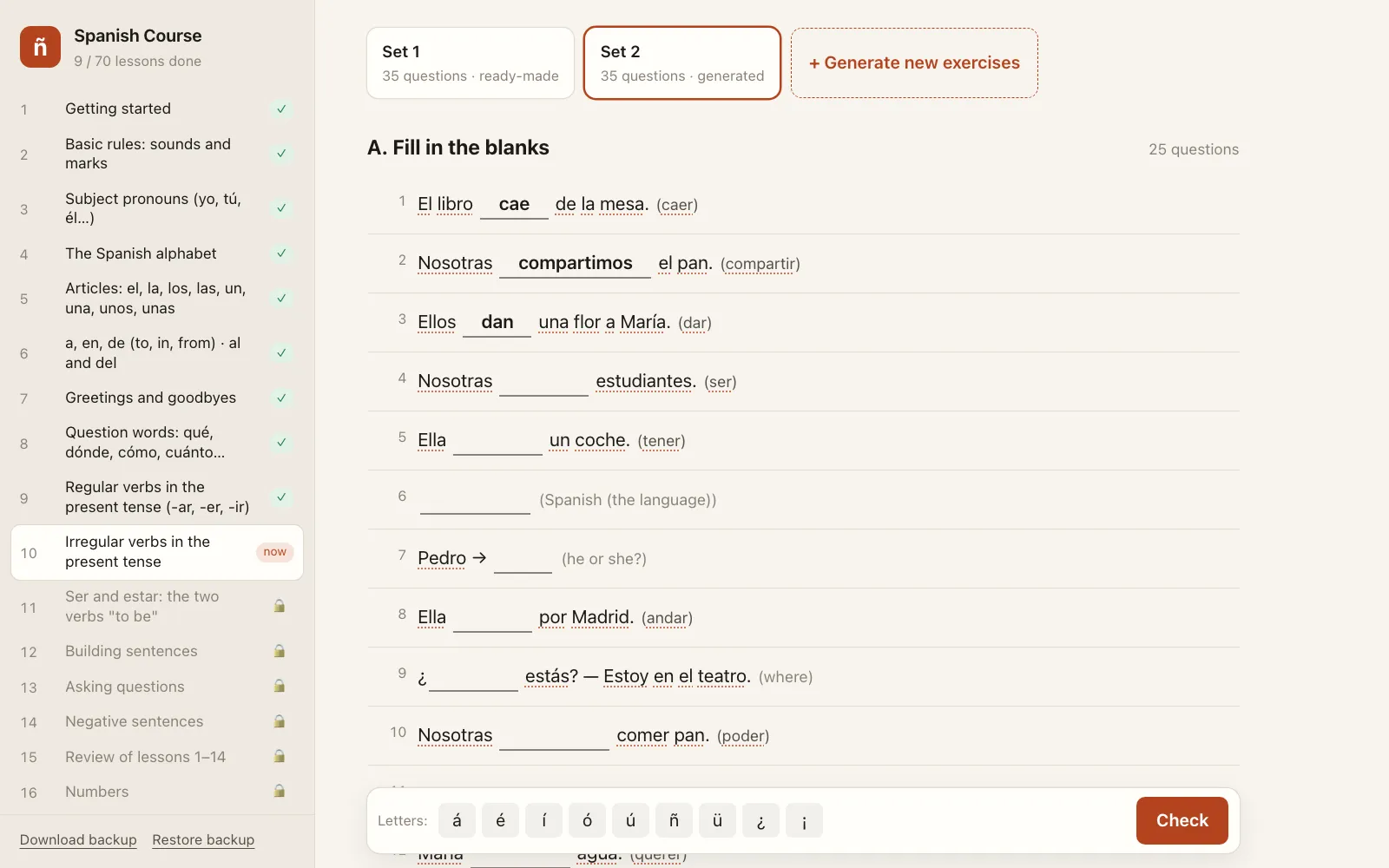
“Generate new exercises” doesn’t call an AI. The app has a dictionary, 33 verbs and the conjugation rules built in. Sentences are built from these and the answer is computed by rule. That way a beginner never gets a wrong question, and there’s no API key or cost.
About 70% of each new set comes from the current lesson and 30% from earlier ones. A lesson 10 set also has the pronouns from lesson 3 and the articles from lesson 5. For irregular verbs the wrong options are picked on purpose: “puedemos” instead of “podemos”, “conoco” instead of “conozco”, the most common mistakes.
4. Meaning on hover
Every Spanish word in the explanations and exercises has a dotted underline. Hovering shows the English; for a verb form it also shows who does it (“quieres → you want · querer”). In test questions, if the meaning would give the answer away, the word stays plain until the answers are checked.
An answer missing only an accent mark counts as correct but is marked in yellow: “adios” passes, with “adiós” shown underneath.
5. Release
I study Spanish through English, so the interface is in English too, always in a light theme. The code is plain HTML, CSS and JavaScript, with no libraries. It lives as a folder in my portfolio repo and is published as a separate Worker on Cloudflare Workers at spanish-course.omertataroglu.com. There’s no account; progress is stored in the browser itself, with backup and restore at the bottom left.
Result
I wrote the message on 18 October 2026, and the first 10 lessons were ready the same day. For new lessons I just tell Claude “I watched lesson 11”: a small tool in the folder downloads the subtitles, and Claude reads the transcript and adds the lesson.
Next up is ser and estar. I’ll get to the past tense at lesson 61; until then every sentence in the app is in the present tense.
Screenshots of the work
The numbers are left exactly as they appear in the dashboards.
If you have a question about this project, drop me a line.
More in Apps