Palabra: Spanish words instead of doom scrolling
I built myself a Spanish app to turn idle minutes on my phone into vocabulary practice. I wrote the rules and screens in a Word document and shipped it with Claude Code in two days. It has 1,500 words, and a word only counts as learned after 2 correct answers on 5 different days.
Open the app- Role
- Product idea, learning rules and design direction; built and shipped with Claude Code
- Period
- Oct 2026
- Platforms
- JavaScript, PWA, Claude Code, Cloudflare Workers, GitHub
- 1,500 A1–A2 words across 26 topics, each with an example sentence
- 5 days × 2 Correct answers needed before a word counts as learned
- 2 days From a Word document to a live app
- 336 KB The whole app; no libraries, opens offline
Context
I’m learning Spanish. I wanted to turn the idle minutes I spend on my phone into vocabulary practice: words instead of doom scrolling. What I needed was simple. An app that opens on my phone, shows one word in the middle with four options below, and honestly counts how many words I’ve learned.
I didn’t start with code; I started with a Word document. I sketched the screen and wrote down everything I wanted as numbered points: what level the words should be, how right and wrong answers should look, what goes in the menu, what the colours should feel like. Two things I was unsure about (should plurals be separate words, where should verb conjugations live) I left as open questions.
Prompt · 9 Oct 2026 The Word document I used as the prompt Read itClose
Translated from the Turkish original. I fixed typos and simplified a sentence or two; otherwise it’s as I wrote it.
Here’s an idea I have. To learn more words while I’m learning Spanish, I want to build a vocab app, something simple I can open on my phone. My goal is learning words instead of doom scrolling.
Features I want in the app:
- A counter that shows how many words I’ve learned. Let’s calculate it like this: if I get a word’s meaning right twice a day on 5 different days, count that word as learned.
- The words should be for someone just starting Spanish, so A1/A2 level. At least when I start using the app, these are the words that should come up first; there’s no point learning C2 level at the start.
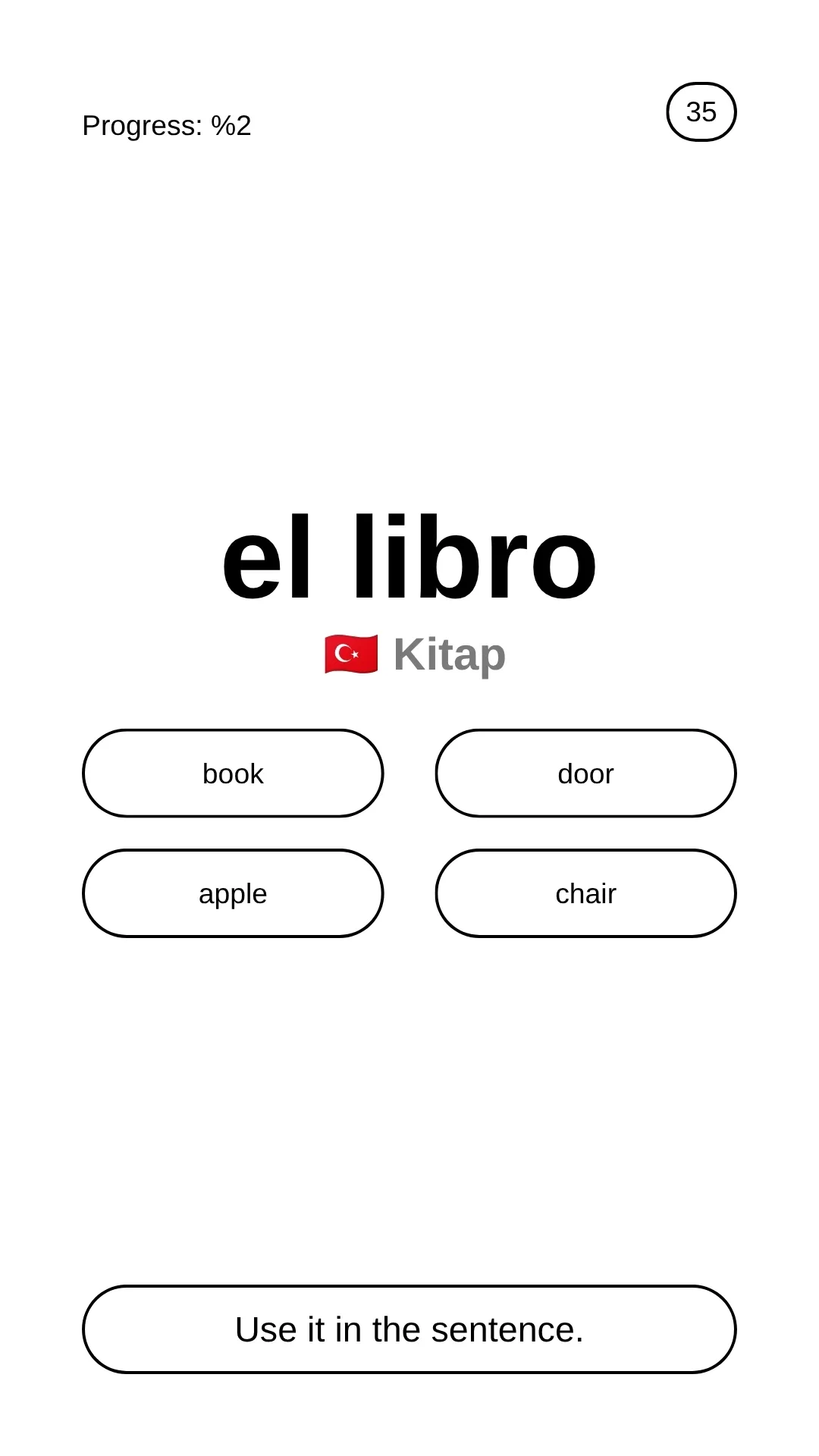
- The word is written in the middle in a slightly larger font. Below it, 4 boxes with rounded corners in 2 columns and 2 rows. When I pick one, if it’s right, the box I picked turns green; if it’s wrong, the box turns red and the correct one turns green for a very short moment, then it moves straight on to the next word.
- I’m torn on whether plurals should be separate words; I need your input here. For example, el libro is one word. Should los libros be a separate word? We’ll decide this.
- Words must always come with their articles: el libro, la casa, el profesor. Not just casa or libro.
- Should conjugated forms also be separate words, or should we see them in a separate section when we want to study conjugations? I’m torn on this too.
- Every time someone opens the app, show a small pop-up with a fun fact about Spain at the bottom, with the first word slightly blurred behind it. They should be general-knowledge facts that catch people’s interest, the kind you can bring up in company. For example, that Basque, spoken in the Basque Country, belongs to no language family and its origin is unknown, phrased like this: “Basque, spoken in the Basque Country, belongs to no language in the world, and its origin is still unsolved.” Sentences should be short and to the point and land the emphasis we want (the detail of “still unsolved” rather than just “unsolved”).
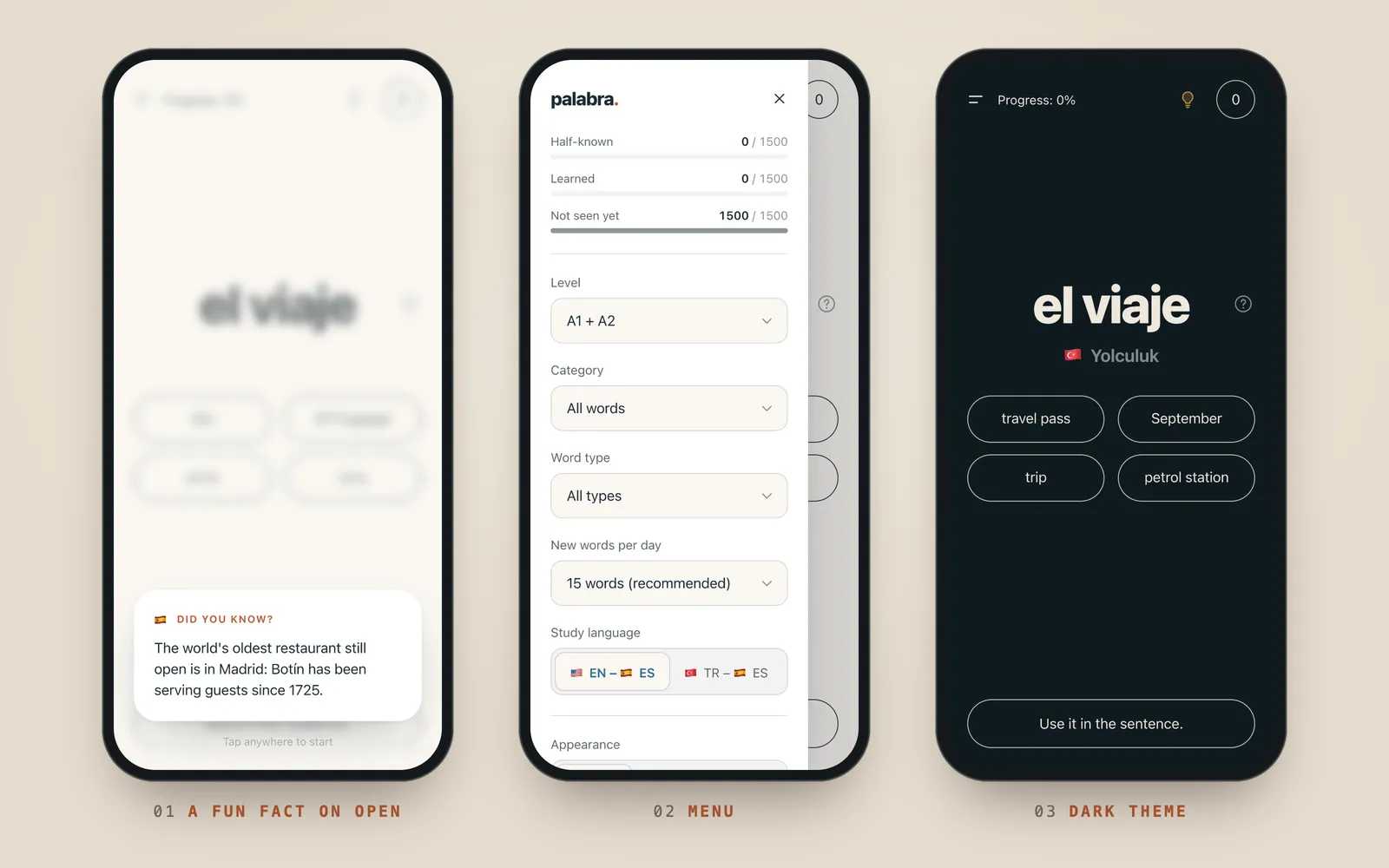
- A configuration menu that sits on the left on the website and as an expandable menu on the left on mobile. There we could pick the level and the word category, e.g. directions, numbers, fruit, food, objects, verbs. But the default mode should be all words. A light and dark mode setting. A fun fact generator: when people tap it, a fun fact box drops onto the screen with a nice, playful animation; that could be fun. That’s enough for the config menu for now; empty space is fine, we’ll fill it as ideas come. Splits like verb, adjective, noun, pronoun too.
- I want to do English–Spanish, for example, but for people who’d rather do Turkish–Spanish there should be an EN-ES or TR-ES option with flags in the configuration menu.
- Tune the words to everyday life in Spain. So the words someone going to Spain would use most, at A1 and A2 level. Say, places and directions, words for a café or a shop, words for chatting with a local about simple things, like where I’m from or what I do.
For colours I want lively Mediterranean colours. Muted tones and a minimalist design. Not AI slop: rather than a lot of information at a glance, I want an aesthetic, minimalist layout that gives the information it needs to without drifting from the purpose.
I made a template for the design idea. Look at the image I sent: where the word goes, where the meaning goes, where the fun fact goes, it’s all there. The number at the top right is the count of learned words; the progress on the left shows what percentage of the words I’ve learned. Under el libro is the Turkish meaning with a flag emoji, and the options are in English. If I tap the Turkish, i.e. the word kitap, that line should switch to English and the options to Turkish. The reverse of each other. Next to the meaning there should be a Turkish or American flag to mark which language it is.
The fun fact won’t show on every word; only when opening the app or when tapped in the config menu on the left.
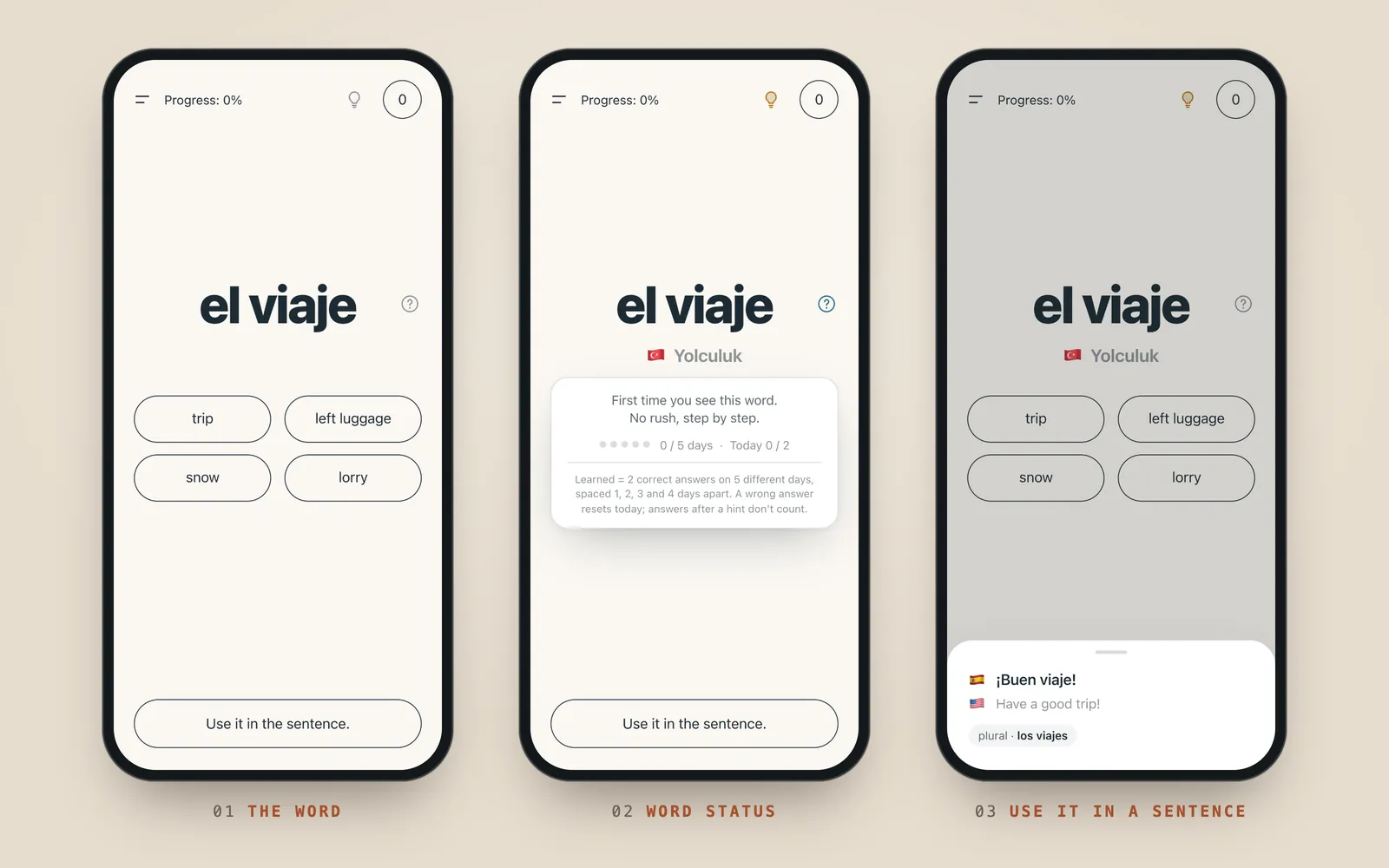
Where the fun fact was, while looking at words, there should be a “Use it in the sentence” section. Let’s show the sentence in Spanish first, with English underneath in a fainter colour. Sentences must never be longer than one line. Tapping it should slide up a card from the bottom without covering the 4 options. Let’s dim the background a little so the card stands out, and the card should come in smoothly. Put the flag of the sentence’s language at the start of each sentence.
Every transition, effect, colour change and so on should feel smooth and premium.
I built the app from that document with Claude Code. The AI wrote the code; I decided the rules, the screens and what had to change, and tested every version by using it. Palabra is Spanish for “word”.
Problem: what does “learned” mean?
In most vocabulary apps the counter goes up after a single correct answer. That shows I remembered the word in that moment, not that I learned it. I wanted the counter to mean something, so the first thing I set was the rule: a word only counts as learned after at least 2 correct answers on each of 5 different days.
The rest of the app grew around that rule.
What I did
1. Repetition rules
- The days are spaced out. A word’s 5 days don’t come back to back; they come 1, 2, 3 and 4 days apart, so the earliest a word can be learned is day 11.
- A wrong answer resets that day. Earlier days aren’t wiped; only that day’s count starts over.
- Hints aren’t free. The meaning starts hidden. If I tap the light bulb and answer correctly after seeing it, the answer doesn’t count and the word stays “half-known”.
- Learned words come back. They return for review after 7, 21, 60 and 120 days. If I get one wrong in review or use the hint, the word starts its 5 days over.
- A daily plan. Reviews that are due come first, then the day’s new words (15 by default, adjustable in the menu). Once the plan is done, new words keep coming.
The question mark next to each word makes these rules visible: it shows which day the word is on and how many times I’ve got it right today.
2. Content
There are 1,500 words: 456 at A1 and 1,044 at A2. They’re grouped into 26 topics around the situations that come up most in daily life: asking for directions, transport, ordering at a café, shopping, home, health, paperwork, meeting someone and making conversation.
I had Claude generate the list and the example sentences under rules I set:
- Nouns always come with their article: not libro, but el libro.
- Every word has a short example sentence in Spanish, English and Turkish.
- Plurals aren’t separate cards; they appear as a small note on the sentence card.
- Verbs are in the infinitive. Conjugations will be a separate section later; their place in the menu is already reserved.
Every launch opens with a short fact about Spain (50 of them, in both languages). The first word waits blurred in the background; tapping the screen starts the session.
3. Design
In the document I asked for Mediterranean colours, muted tones and a minimal layout that doesn’t show too much at a glance. A correct answer turns olive green; accents are terracotta and ochre. The screen only holds the word, four options and progress at the top; everything else lives in the menu or in cards that open on tap. There’s a light and a dark theme.
The study language is picked in the menu: English–Spanish or Turkish–Spanish. I study through English; the Turkish option is for others. Tapping the meaning line swaps the languages of the meaning and the options.
4. Like a native app on the phone
Palabra is a PWA: it installs on the phone via Safari’s “Add to Home Screen”, opens full screen and works without an internet connection. There’s no account; progress is stored on the phone itself. In case of a new phone, the menu has backup and restore.
The code is plain HTML, CSS and JavaScript, with no framework or library; the whole app is 336 KB. The code lives on GitHub, and every change pushed to the main branch goes live on Cloudflare Workers automatically.
Result
I wrote the Word document on 9 October 2026; the next day the app was live at palabra.omertataroglu.com. Most of the changes in between came from trying the first version: the question mark showing a word’s status, the hint light bulb, the three progress bars in the menu.
For now it’s for my own use. The next step is opening it to everyone, which will need accounts and sync across devices, since progress currently lives on a single phone.
Screenshots of the work
The numbers are left exactly as they appear in the dashboards.
If you have a question about this project, drop me a line.
More in Apps