Ziya Teknik: a financial dashboard that reads Google Sheets records
I built a dashboard that reads sales, customer and expense records from Google Sheets and shows revenue, gross profit, open jobs and targets on one screen. The demo here runs entirely on sample data.
Live demo- Role
- Product design, interface, data model and Sheets integration
- Period
- Oct 2026
- Platforms
- Node.js, Google Sheets API, JavaScript, SVG
- 3 Sheets tabs: sales, customers, expenses
- ₺ / $ Each sale converted to dollars at its own day’s rate
- 60 s Refresh interval from the sheet in live mode
- 0 Chart libraries; every chart is hand-drawn SVG
Note: The screenshots and the live demo on this page run entirely on sample data. Names, transactions, amounts and exchange rates come from a fictional data generator; they are not real business data, nor a transformed version of it. The Google Sheets connection is turned off in the demo. The interface is in Turkish.
Context
Ziya Teknik is a family-run battery rebuilding workshop in Mersin. I’ve covered its site and ads separately (website, Paid Ads); this page is about the back-office side of the business.
The workshop’s records were already kept in Google Sheets: sales in one tab, the items customers dropped off and their pickup dates in another, shop expenses in a third. The data was there, but asking it questions was hard. “Is this month better than last month?”, “Which product group earns the most?”, “How many jobs have been waiting for a week?” — each of those meant a separate filter and a separate formula.
What I did
I built a dashboard that reads the sheets without changing them. Data entry stays in Sheets the way they’re used to; the dashboard only reads and analyzes.
1. The Sheets connection
A small Node.js server reads the three tabs through the Google Sheets API, converts the rows into a shared data model and hands them to the browser as a single JSON. In live mode it refreshes every 60 seconds. Missing or malformed rows don’t drop out silently; they show up as a warning at the top of the screen. The sheet address and keys stay on the server and never reach the browser.
2. Screens built around questions
- Overview: Revenue, gross profit, shop expenses and the bottom line after expenses — each compared with the previous period.
- Sales: A daily revenue and profit chart, a breakdown by payment method, and a searchable sales table.
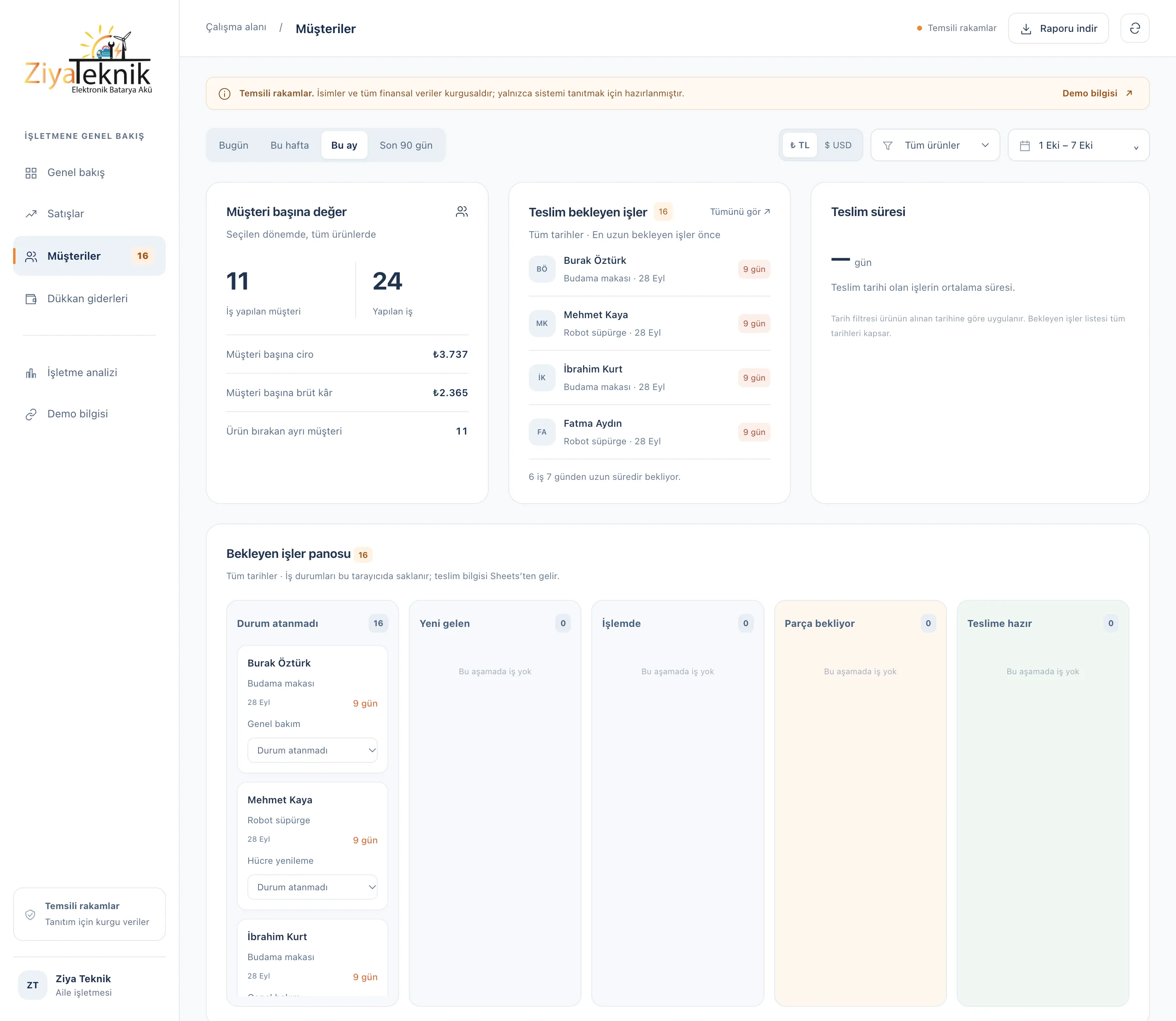
- Customers: Revenue and profit per customer, average turnaround time, and a board of open jobs.
- Shop expenses: Small purchases, kept separate from product cost.
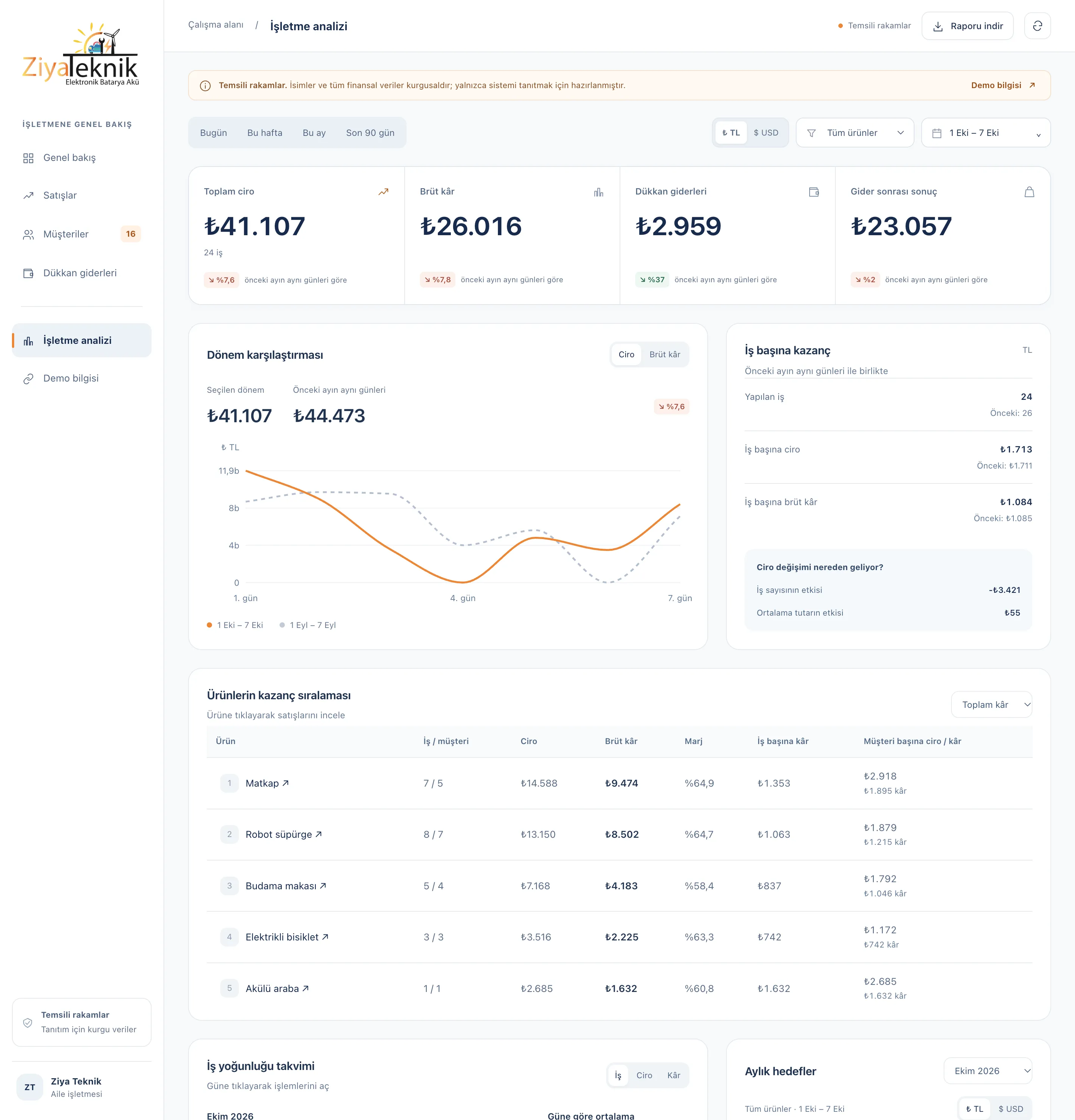
- Business analysis: A breakdown showing whether a change in revenue came from the number of jobs or the average ticket, products ranked by profit, a workload calendar by day, and monthly targets.
Every chart drills down to the records: click a day, a product group or a payment method and the list of those transactions opens. The period report can be downloaded as CSV.
3. Lira and dollars
In an inflationary period, looking only at lira can make growth look better than it is. So every sale is converted to dollars at the rate on its own date, and the whole screen switches to dollars with one click.
4. Design
The interface uses navy and orange on a white background. I didn’t use a chart library: the line, donut and pie charts, the heat calendar and the date picker are hand-written SVG and JavaScript. On mobile the menu moves to the bottom and tables scroll horizontally.
This demo
The version in the portfolio is a separate copy. I replaced the Node.js server’s data endpoint with a fictional data generator that runs in the browser; the Sheets connection, sheet address and keys aren’t in this copy. The design, charts, filters, targets and job board are the same as the original. Targets and job statuses are stored only in your own browser.
Screenshots of the work
The numbers are left exactly as they appear in the dashboards.
If you have a question about this project, drop me a line.
More in Reporting