A morning ad report with per-ad-set alerts
Yesterday’s Meta ad results land in Telegram at 08:00 every morning. Any ad set that got more expensive, spent without bringing in a message, or saw its frequency climb while costs rose is flagged on the first line.
- Role
- The whole flow — Meta API queries, alert rules, AI comment and error alerts
- Period
- Oct 2026 – present
- Platforms
- n8n, Meta Marketing API, Gemini API, Telegram
- 08:00 Yesterday’s report in Telegram every morning
- 3 Per-ad-set alert rules
- 6 days Each set compared with its own previous days
Context
I run Ziya Teknik’s Meta ads with product-based ad sets. I’ve explained my decisions with the numbers on the Paid Ads page: I look at a set once its frequency passes 3, I keep an expensive set running as long as the cost stays affordable, and I switch it off once it doesn’t.
Every one of those rules depends on looking every day. Noticing three days late that a set has become expensive means having given it three days of budget. But opening Ads Manager every morning and checking each set one by one depends on remembering to, and on busy days it gets skipped.
Instead of having to remember to look, I wanted the report to come to me every morning.
What I did
I built an n8n flow that runs every morning. It pulls yesterday’s data from Meta, compares each ad set with its own history and sends the summary to Telegram. The full flow is at the bottom of the page; click the nodes to read what each step does. The Telegram images there are samples made with a fictional store’s data; the real report is laid out exactly the same way.
The flow is also on GitHub. You can import it into n8n and run it with your own ad account and Telegram bot; the setup steps are in the README.
1. When the report arrives
From 08:00 the flow wakes up every 5 minutes. If today’s report has already gone out, it stops right away; if not, it pulls the data from Meta and sends the report. Running once at a fixed time would have been simpler, but if Meta didn’t respond at that moment, there would be no report that day. Now it keeps trying until the report goes out.
2. Account summary
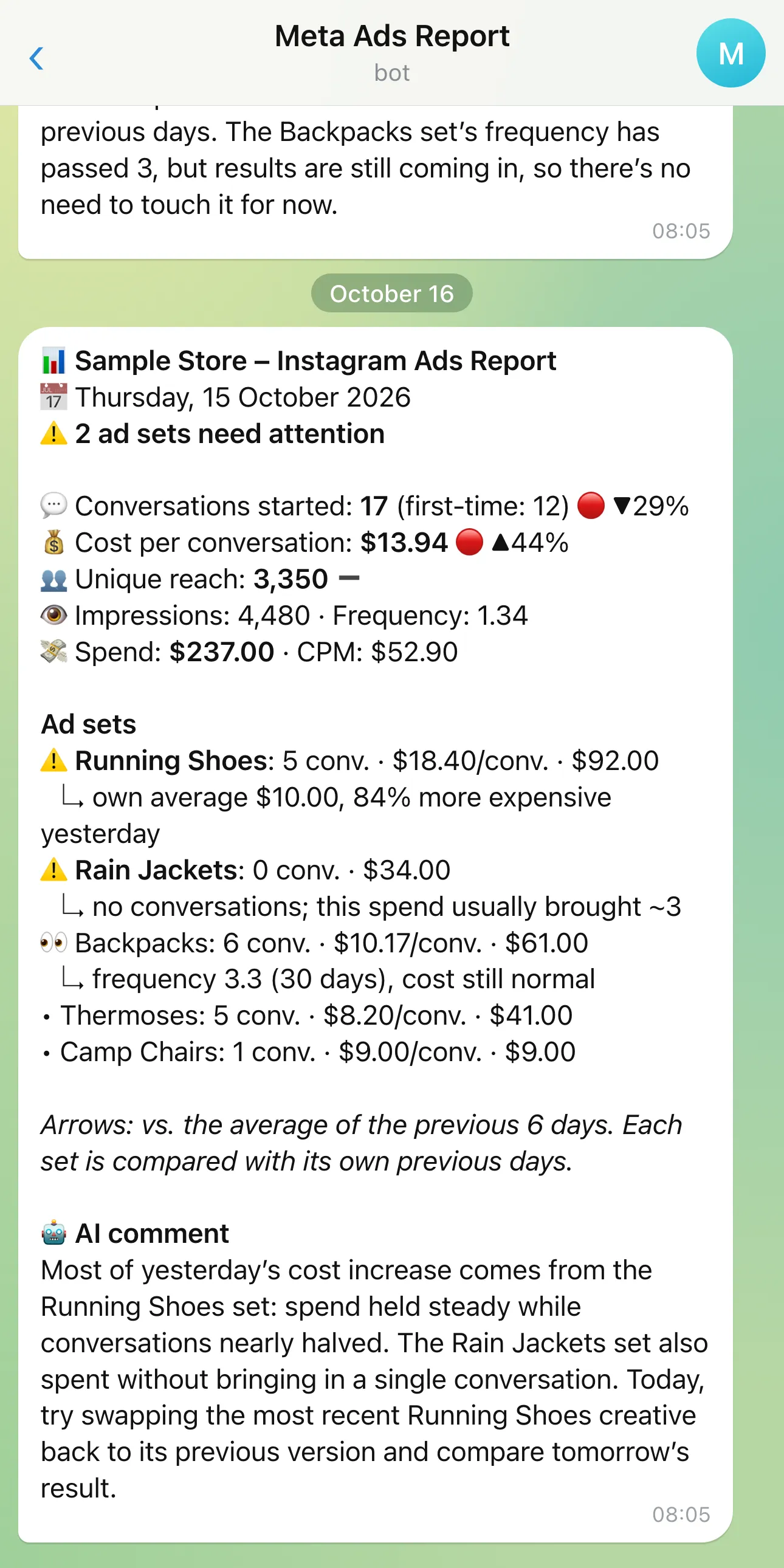
The top of the report is the account’s total for yesterday: people who started a conversation, cost per conversation, reach, impressions, frequency and spend. Each figure has an arrow comparing it with the average of the previous 6 days. More conversations is green; a higher cost is red.
3. Per-ad-set alerts
The first version only showed account and campaign totals. My setup has product-based ad sets under a single campaign, so the report said “40 conversations yesterday” but not which set was going wrong. That was exactly what I needed to see.
Now each set’s result for yesterday is judged against its own previous 6 days. I compare sets with their own history rather than with each other because their normal costs differ: on Hoverboard, the cost per conversation is nearly twice that of Drill. With a single threshold for both, Hoverboard would come up red every day.
There are three rules:
Cost jumped. The cost per conversation is 40% above the set’s own average.
Spent, but no messages. The set spent enough to normally bring in two conversations and brought in none.
Frequency is high and it’s getting expensive. If frequency over the last 30 days has passed 3, the set goes on a watch list. If its cost has also risen by more than 20%, that becomes an alert; if results are still coming in, it’s only marked as being watched. This is the same rule I wrote on the Paid Ads page: frequency is a warning for me, not a decision.
Sets with alerts sit at the top of the message, with the reason right under them. So that the first line is enough on its own, it reads either “⚠️ 2 ad sets need attention” or “✅ nothing in the ad sets needs attention” (in Turkish).
The flow doesn’t make decisions; it only tells me where to look. Switching a set off or changing the creative is still my job.
4. Why these thresholds
Small sets make daily data noisy. On a set that spends a few lira a day, a single conversation can double the cost or halve it. That’s why a set that spent less than TRY 20 yesterday, or had fewer than 5 conversations over the previous days, doesn’t get a cost alert.
The 40% threshold is high on purpose. On a set like Drill, which brings in 7–8 conversations a day, a 30% swing from one day to the next is ordinary. If an alert came every morning, after a while I’d stop looking at them. All the thresholds live in the flow’s settings node; after a few weeks of alerts I’ll adjust them if needed.
5. The AI comment
At the end of the report there’s a comment from Gemini of three sentences at most. If a set has an alert, it focuses on the most important one and suggests one action to try that day; if there are no alerts, it gives a short read on how things are going. I also wrote into the prompt that it shouldn’t suggest touching a set whose frequency is high but whose cost is normal, so it doesn’t contradict my own rule.
If Gemini doesn’t respond, the report goes out without a comment. The report itself doesn’t depend on the AI.
6. When the flow breaks
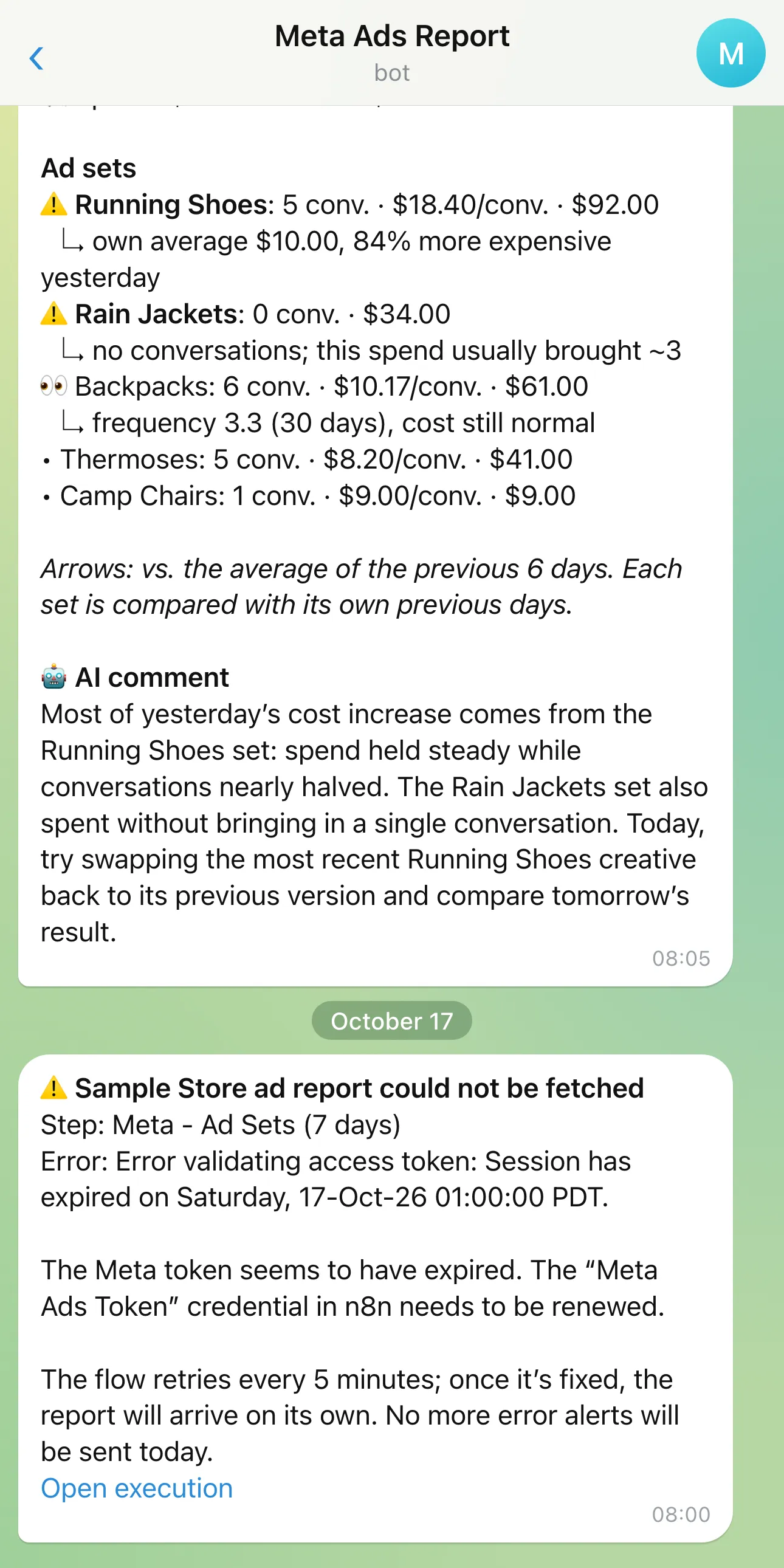
The worst case for a system like this is the report quietly not arriving. If Meta’s access token expires, the flow fails all day, no report comes, and I might not notice that it didn’t.
So if any step of the flow fails, a separate alert comes to Telegram: which step it stopped at, why, and a line that says so plainly if the token has expired. Because the flow retries every 5 minutes, this alert goes out once a day at most.
Then there’s the case where the account spent nothing at all yesterday. That isn’t an error, but it’s often a sign of one: a declined payment method or a restricted account. The report comes with a short warning in that case too.
Outcome
I don’t have to remember to open Ads Manager. In the morning I look at the first line: if it’s ✅, I get on with my day; if it’s ⚠️, it says which set was flagged and why, and I open Ads Manager for that set.
Screenshots of the work
The numbers are left exactly as they appear in the dashboards.
Drag to explore · click a node
What I learned
- I built the first version at account and campaign level. With product-based ad sets under a single campaign, the report couldn’t tell me which set was going wrong. I’d start at ad set level.
- I added the error alert later. A report that doesn’t arrive is a signal too, but an easy one to miss; the alert belonged in the first version.
If you have a question about this project, drop me a line.
More in Reporting